
Introduction: MacSync Infostealer — Why It Matters
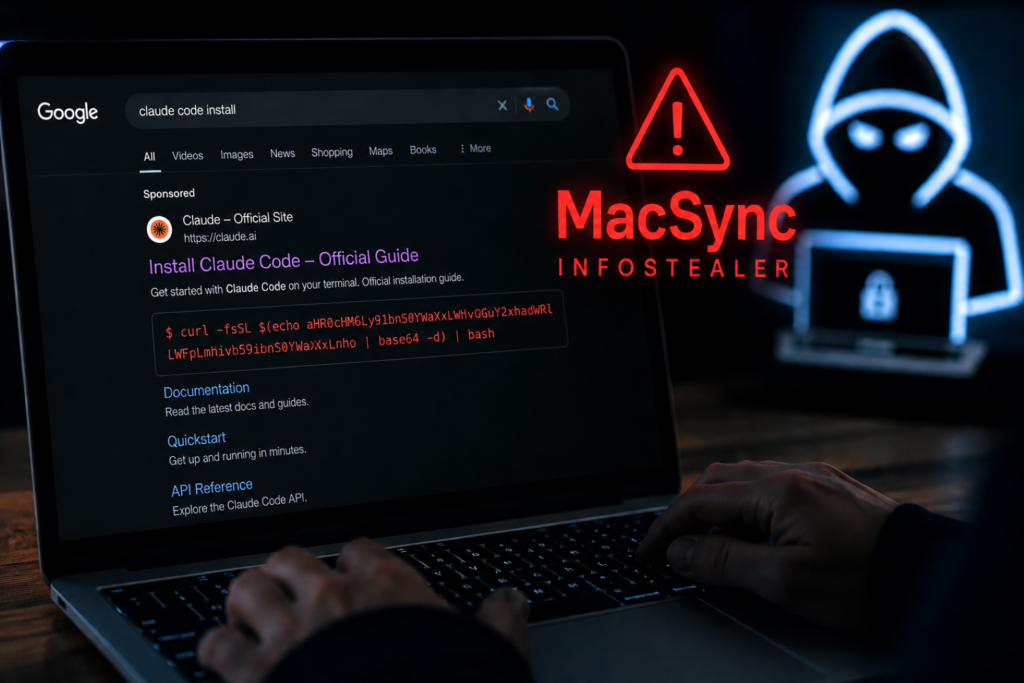
A new malware campaign is targeting macOS developers through fake Google Ads promoting Claude Code installation instructions. MacSync Infostealer disguises itself as a legitimate installation guide, tricking users into executing a malicious Terminal command that installs the MacSync infostealer.
The campaign is particularly dangerous because the sponsored advertisement appears to redirect users through what looks like the legitimate Claude AI domain, making the attack difficult to identify. Security researchers warn that anyone who executes the provided command should treat the incident as a complete device and credential compromise.
What is Claude Code?
Claude Code is a command-line coding assistant developed for developers who use Anthropic’s Claude AI models. Many developers search online for installation instructions, making it an attractive target for cybercriminals looking to exploit trust in popular AI development tools.
As AI-powered coding assistants continue gaining popularity, attackers are increasingly creating fake installation guides, malicious repositories, and deceptive advertisements to distribute malware.
What Caused the Incident?
According to security researchers, attackers purchased Google Ads that appear when users search for Claude Code installation instructions.
Instead of directing users to legitimate documentation, the advertisement presents a malicious installation command. The command conceals a harmful download URL using Base64 encoding, making it appear less suspicious before downloading the MacSync infostealer onto the victim’s Mac.
MacSync Infostealer: Full Technical Breakdown
Timeline of Events
- Attackers create fake Google Ads targeting Claude Code searches.
- Users click the sponsored search result.
- Victims receive a malicious installation command.
- Base64 encoding hides the actual download URL.
- The command installs the MacSync infostealer.
- Malware steals sensitive information and establishes persistence on the system.
What Data and Systems Were Affected?
The malware is capable of stealing:
- macOS Keychain credentials
- Browser passwords
- Session cookies
- SSH keys
- Cloud platform credentials
- Developer API tokens
- Cryptocurrency wallet information
Researchers also found that the malware creates persistence using a fake Google Keystone LaunchAgent and can modify Ledger Live to capture cryptocurrency wallet data.
Potential Risks & Impact
Identity and Financial Risk
Stolen credentials can provide attackers with access to email accounts, cloud services, development platforms, cryptocurrency wallets, and other sensitive resources. Session cookies may also allow attackers to bypass multi-factor authentication in certain situations.
Business and Operational Risk
Compromised developer credentials can expose source code repositories, CI/CD pipelines, cloud infrastructure, and production environments. Organizations may face operational disruption if privileged accounts are abused.
Compliance Risk
Businesses affected by credential theft may need to investigate potential unauthorized access, rotate credentials, and comply with applicable cybersecurity and data protection regulations depending on their jurisdiction.
Official Response
At the time of writing, researchers recommend treating any execution of the malicious installation command as a complete system compromise. Users who suspect infection should immediately disconnect the affected Mac from the network, revoke active sessions, rotate credentials, and rebuild the compromised device.
Industry Context: Why This Type of Attack is Increasing
Cybercriminals are increasingly exploiting the rapid adoption of AI developer tools. Instead of attacking software directly, attackers now target users searching for installation guides, documentation, and developer resources through search engine advertisements.
Readers interested in similar threats can also explore CyberNexora’s Cyber Incidents, Learn & Protect, and Resources sections:
How to Protect Yourself and Your Organization
- Avoid clicking sponsored search results for software downloads.
- Verify installation instructions using official vendor documentation.
- Inspect Terminal commands before executing them.
- Avoid commands that disable certificate validation or hide download sources.
- Enable endpoint security monitoring on developer devices.
- Rotate credentials immediately if compromise is suspected.
- Review cloud, Git, and CI/CD access after an incident.
- Reimage infected systems instead of relying solely on malware removal.
Indicators of Compromise (IoCs)
- Suspicious Base64-encoded Terminal commands
- Unexpected outbound network connections
- Fake Google Keystone LaunchAgent
- Unauthorized access to macOS Keychain
- Modified Ledger Live application
- Unexpected credential or session theft
Key Takeaways
- Fake Google Ads are distributing the MacSync infostealer.
- The campaign specifically targets developers searching for Claude Code installation instructions.
- The malware steals credentials, cloud secrets, SSH keys, and cryptocurrency wallet data.
- Researchers recommend treating infected systems as fully compromised.
- Organizations should immediately isolate affected devices and rotate all credentials.
Conclusion: MacSync Infostealer and What Happens Next
The MacSync Infostealer campaign demonstrates how cybercriminals continue adapting their tactics by exploiting trusted developer tools and search engine advertisements. Even experienced developers can be deceived when malicious installation instructions closely resemble legitimate documentation.
As AI-powered development platforms become more popular, organizations should strengthen security awareness, verify software sources, and closely monitor privileged developer endpoints.
Frequently Asked Questions(FAQs)
MacSync Infostealer is a macOS malware campaign that spreads through fake Claude Code installation guides promoted via Google Ads. It steals credentials, session cookies, SSH keys, cloud secrets, and cryptocurrency wallet information.
The attacker provides a Terminal command that hides a malicious download URL using Base64 encoding. When executed, it downloads and installs the MacSync infostealer.
The malware can collect macOS Keychain data, browser passwords, session cookies, SSH keys, developer tokens, cloud credentials, and cryptocurrency wallet information.
Immediately disconnect the Mac from the network, rotate all passwords, revoke active sessions, review cloud and CI/CD access, and reinstall the operating system from a trusted source.
Always download software from official sources, avoid sponsored search results for developer tools, inspect Terminal commands carefully, and use endpoint security solutions to detect suspicious activity.