
Introduction
Cybersecurity researchers have identified a growing threat known as ClickFix Malware, a deceptive technique that relies on human interaction instead of software vulnerabilities. Rather than exploiting a flaw in an operating system or application, attackers manipulate victims into running malicious commands themselves.
This emerging social engineering attack has been observed across phishing campaigns, compromised websites, malicious advertisements, and fake technical support pages. The technique is highly effective because it abuses user trust and leverages legitimate operating system tools to deliver malware.
As organizations continue strengthening technical defenses, cybercriminals are increasingly focusing on psychological manipulation, making awareness and education critical components of modern cybersecurity.
Understanding the ClickFix Technique
The ClickFix method is a malware delivery campaign designed to convince users that a security verification process is required before accessing content or services.
Victims are typically presented with convincing prompts such as:
- Security verification required
- Human verification needed
- Browser validation failed
- Access confirmation required
- Authentication process incomplete
These messages imitate trusted online services and create a sense of urgency that encourages immediate action.
Unlike traditional attacks that exploit vulnerabilities automatically, this technique depends on the victim completing the final step.
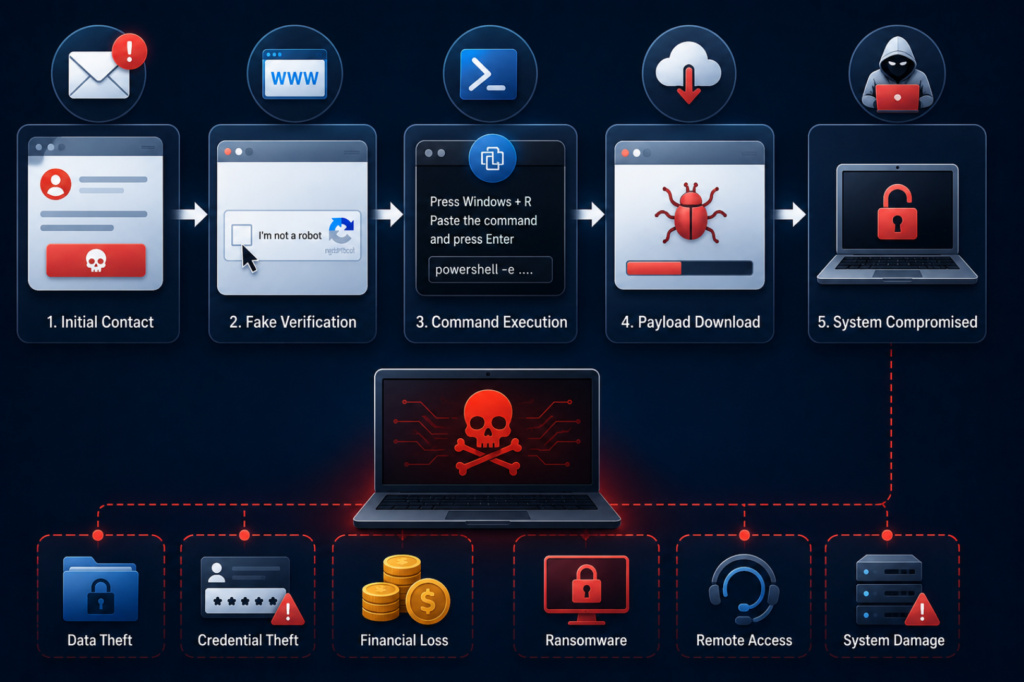
Attack Chain Breakdown
Initial Contact
Threat actors distribute malicious links through multiple channels:
- Phishing emails
- Social media messages
- Search engine poisoning
- Malvertising campaigns
- Compromised websites
- Fake software portals
The goal is to direct users toward a malicious verification page controlled by attackers.
Deceptive Verification Stage
Upon arrival, victims encounter a realistic interface that mimics a legitimate CAPTCHA or security validation screen.
Common examples include:
- Browser security checks
- Human verification requests
- Cloud authentication prompts
- Access validation notices
- Document verification pages
This stage forms the core of the social engineering attack by establishing credibility and trust.
Command Execution
Users are instructed to:
- Copy a displayed command
- Open Windows Run or PowerShell
- Paste the command
- Execute the instruction
What appears to be a harmless verification step is actually a command execution attack that initiates malware delivery.
Payload Deployment
The executed command contacts attacker-controlled infrastructure and downloads additional components.
These may include:
- Information stealers
- Credential harvesting tools
- Banking trojans
- Remote access trojans
- Cryptocurrency stealers
- Ransomware loaders
Once installed, attackers gain a foothold on the compromised device.
Why Fake CAPTCHA Malware Is So Effective
One reason Fake CAPTCHA Malware campaigns continue to succeed is user familiarity with verification systems. Internet users routinely complete CAPTCHA challenges when accessing websites, creating accounts, or downloading content.
Cybercriminals exploit this behavior by replacing legitimate verification tasks with instructions that facilitate malware installation.
Victims often trust the process because:
- CAPTCHA requests are common online
- Security checks appear routine
- The interface resembles trusted services
- The request seems harmless
This combination significantly increases the likelihood of successful compromise.
The Role of PowerShell Malware
Many attacks leverage PowerShell Malware techniques because PowerShell is a legitimate administrative tool built into Windows.
Threat actors favor it because it can:
- Execute scripts
- Download remote files
- Automate system actions
- Establish persistence
- Communicate with remote servers
A malicious PowerShell command may silently retrieve payloads, execute hidden scripts, and connect to command-and-control infrastructure.
Because PowerShell is commonly used in enterprise environments, malicious activity can blend with legitimate administrative operations if monitoring is insufficient.
Potential Impact on Individuals and Businesses
Credential Theft
One of the most common objectives is stealing authentication data, including:
- Email credentials
- Corporate accounts
- VPN access details
- Browser-stored passwords
- Cloud platform credentials
Compromised accounts can enable further unauthorized access.
Financial Fraud
Attackers may collect:
- Banking information
- Online payment credentials
- Cryptocurrency wallet details
- Financial account data
Stolen information is frequently sold through underground marketplaces.
Network Intrusion
In corporate environments, a single compromised device may provide:
- Initial network access
- Internal reconnaissance opportunities
- Lateral movement pathways
- Privilege escalation possibilities
- Data exfiltration channels
Ransomware Risk
Several threat groups use this infection method as an initial access vector before deploying ransomware.
The result may include:
- Business disruption
- Data encryption
- Operational downtime
- Financial losses
- Reputation damage
Indicators of Compromise
Organizations should monitor for suspicious activity associated with these attacks.
Potential warning signs include:
- Unexpected PowerShell execution
- Unknown scheduled tasks
- New startup processes
- Unusual outbound connections
- Credential theft alerts
- Suspicious command-line activity
- Security tool modifications
- Unauthorized account access
Early detection can significantly reduce the impact of an incident.
Security Recommendations
Strengthen User Awareness
Employees should understand that legitimate services rarely require users to manually execute commands through PowerShell or Command Prompt.
Training should focus on:
- Phishing recognition
- Verification scams
- Browser warning fraud
- Suspicious command requests
- Social engineering techniques
Monitor Administrative Tools
Security teams should:
- Enable PowerShell logging
- Review script activity
- Restrict unnecessary privileges
- Implement application control policies
Deploy Endpoint Detection
Modern endpoint protection solutions can identify:
- Malicious script execution
- Suspicious process creation
- Credential theft behavior
- Malware download activity
Enable Multi-Factor Authentication
MFA provides an additional layer of protection even when credentials are compromised.
Maintain Continuous Monitoring
Organizations should monitor:
- Outbound network traffic
- Authentication anomalies
- Endpoint behavior
- Command-and-control communication
Best Practices for Users
Individuals can reduce risk by following several precautions:
- Never run unknown commands
- Verify software updates through official sources
- Avoid suspicious verification pages
- Keep systems updated
- Use strong passwords
- Enable multi-factor authentication
- Install reputable endpoint protection
- Remain cautious of unexpected security prompts
If a website asks you to paste commands into PowerShell or Command Prompt, treat the request as suspicious.
Conclusion
ClickFix Malware highlights a growing trend in cybercrime where attackers prioritize manipulation over technical exploitation. By abusing trust, fake verification systems, and legitimate administration tools, threat actors can compromise systems without exploiting software vulnerabilities.
Organizations should combine security awareness, endpoint monitoring, authentication controls, and proactive threat detection to defend against these evolving campaigns. As social engineering tactics continue to advance, recognizing deceptive behavior remains one of the most effective cybersecurity defenses.
What is ClickFix Malware?
It is a social engineering technique that tricks users into executing malicious commands that install malware on their systems.
How does Fake CAPTCHA Malware work?
Attackers present a fake verification page and instruct victims to run commands that download malware.
Why is PowerShell commonly used in these attacks?
PowerShell is a trusted Windows administration tool capable of downloading files and executing scripts.
Can antivirus software detect these threats?
Modern security solutions can often detect malicious behavior, but user awareness remains essential.
How can organizations protect against this threat?
Implement security awareness training, endpoint protection, PowerShell monitoring, MFA, and continuous network monitoring.