Close Menu
    What's Hot

    QR Code Phishing Attacks : How Quishing Scams Are Targeting Mobile Users

    May 15, 2026

    Gujarat Fake Trading App Cyber Fraud Case: ₹49 Lakh Investment Scam Exposes Rising Digital Fraud Threats

    May 14, 2026

    Australian Financial Firm Cybersecurity Failure 2026: FIIG Securities Fined $2.5 Million After Major Data Breach

    May 13, 2026

    Foxconn Ransomware Attack: 8TB Data Theft Claims Raise Major Supply Chain Security Concerns

    May 13, 2026

    Google AI-Generated Zero-Day Exploit 2026: Cybersecurity Enters a New Era of AI-Powered Attacks

    May 12, 2026
    Facebook X (Twitter) Instagram
    Friday, May 15
    CyberNexora News
    X (Twitter) Instagram LinkedIn
    • Home
    • Cyber Incidents
    • laws & government
    • Penalties
    • Learn & Protect
    • Resources
    • Contact Us
    Get Cyber Alerts
    CyberNexora News
    Home»Learn & Protect»How to Protect Your AI Conversations and Browser Data

    How to Protect Your AI Conversations and Browser Data

    Browser Extensions and AI Tools: Hidden Data Security Risks
    Zeel_CyberexpertBy Zeel_CyberexpertJanuary 7, 2026Updated:March 4, 20263 Mins Read
    Facebook Twitter LinkedIn Email Telegram

    Modern web browsers have become powerful platforms that host sensitive work, communication, and decision-making tools — especially artificial intelligence services such as ChatGPT and DeepSeek. As a result, browser activity now contains some of the most sensitive personal and business data users handle.

    This makes browsers, extensions, and AI tools attractive targets for data harvesting and surveillance.

    Protecting yourself requires understanding where risks come from and how to reduce exposure.

    Why Browser Extensions Are a Security Risk

    Browser extensions run with deep access inside the browser environment. Depending on permissions, an extension may be able to:

    • Read the content of web pages
    • Monitor user activity across websites
    • Access form inputs and messages
    • Track browsing behavior
    • Communicate freely with external servers

    Even extensions that appear legitimate can become dangerous if:

    • They are compromised later through an update
    • Their ownership changes
    • Their policies change silently
    • They include third-party tracking or analytics code

    Once installed, users rarely monitor what an extension actually does in the background.

    Why AI Conversations Require Extra Caution

    AI platforms are often used for:

    • Writing emails and documents
    • Analyzing business data
    • Debugging code
    • Discussing legal, financial, or personal issues

    This means AI prompts and outputs frequently contain:

    • Company secrets
    • Personal data
    • Confidential strategy
    • Technical intellectual property

    If this information is collected without consent, it becomes a privacy, legal, and security risk.

    Practical Steps to Reduce Your Risk
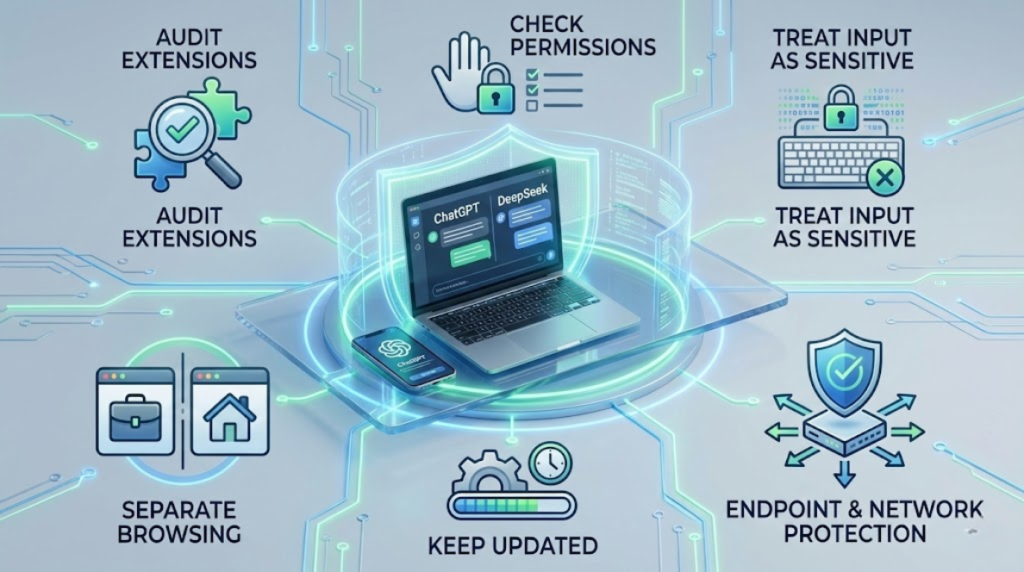
    1. Audit Browser Extensions Regularly

    Review installed extensions every few weeks. Remove anything you don’t actively use. The fewer extensions you have, the smaller your attack surface.

    2. Check Permissions Carefully

    Before installing any extension:

    • Read the permissions it requests
    • Be suspicious of extensions asking for access to all websites or browsing data
    • Avoid extensions that ask for broad permissions without a clear technical reason

    3. Treat AI Input as Sensitive Data

    Avoid sharing:

    • Passwords or credentials
    • Financial details
    • Internal company data
    • Private client information

    Think of AI chat inputs as semi-public unless explicitly protected by enterprise security policies.

    4. Separate Work and Personal Browsing

    If possible:

    • Use different browser profiles for work and personal activity
    • Do not install experimental or entertainment extensions in your work browser
    • Keep work systems clean and controlled

    5. Keep Browsers and Systems Updated

    Security updates often fix vulnerabilities exploited by malicious extensions or scripts. Delayed updates increase exposure time.

    6. Use Endpoint and Network Protection

    Security tools that monitor outbound traffic can sometimes detect suspicious connections to unknown servers, helping identify data exfiltration activity.

    For Organizations

    Organizations should treat browser environments as managed endpoints, not personal spaces.

    This includes:

    • Enforcing extension allowlists
    • Blocking unauthorized extensions
    • Monitoring browser network behavior
    • Educating employees about browser-based risks
    • Treating AI interaction data as sensitive corporate information

    Conclusion

    Cybersecurity today is not only about defending against external attacks — it is also about controlling what runs inside trusted tools.

    As browsers evolve into full application platforms and AI becomes part of everyday work, protecting your digital behavior becomes as important as protecting your digital infrastructure.

    Security is no longer just about locking doors — it is about knowing who is inside.

    Share. Facebook Twitter LinkedIn Email Telegram

    latest news

    QR Code Phishing Attacks : How Quishing Scams Are Targeting Mobile Users

    May 15, 2026

    Gujarat Fake Trading App Cyber Fraud Case: ₹49 Lakh Investment Scam Exposes Rising Digital Fraud Threats

    May 14, 2026

    Australian Financial Firm Cybersecurity Failure 2026: FIIG Securities Fined $2.5 Million After Major Data Breach

    May 13, 2026

    Foxconn Ransomware Attack: 8TB Data Theft Claims Raise Major Supply Chain Security Concerns

    May 13, 2026

    Google AI-Generated Zero-Day Exploit 2026: Cybersecurity Enters a New Era of AI-Powered Attacks

    May 12, 2026

    South Staffordshire Water Data Breach Fine 2026: ICO Issues Nearly £1 Million Penalty After Cybersecurity Failures

    May 11, 2026

    OWASP Mobile Top 10-2024: Critical Mobile App Security Risks Every Security Professional Should Know

    May 10, 2026

    LockBit 5.0 Ransomware Attack on VP Brands International: Cybersecurity Threat Analysis and Business Impact

    May 10, 2026

    Vidar Malware Campaign: Fake Software Downloads Used to Steal Corporate Credentials

    May 9, 2026

    AI Phishing Attacks-2026: How Cybercriminals Use ChatGPT and Claude

    May 9, 2026
    Recent Posts
    • QR Code Phishing Attacks : How Quishing Scams Are Targeting Mobile Users
    • Gujarat Fake Trading App Cyber Fraud Case: ₹49 Lakh Investment Scam Exposes Rising Digital Fraud Threats
    • Australian Financial Firm Cybersecurity Failure 2026: FIIG Securities Fined $2.5 Million After Major Data Breach
    Top Posts

    Unauthorized Access Incident at Coupang Exposes Customer Data

    December 29, 2025

    Significant Data Breach at Korean Air Subcontractor Exposes Employee Records

    December 29, 2025

    New York Passes Cybersecurity Procurement Law for State and Local Agencies

    December 30, 2025
    About

    CyberNexora Blog provides trusted cybersecurity news, attack analysis, and security awareness updates. Our goal is to educate and inform readers about emerging cyber threats and best protection practices.

    Facebook X (Twitter) Instagram Pinterest LinkedIn
    Pages
    • Home
    • Cyber Incidents
    • laws & government
    • Penalties
    • Learn & Protect
    • Resources
    • Contact Us

    Get Cyber Security Alerts

    Thanks! Please check your email to confirm subscription.

    • About CyberNexora News
    • Privacy Policy
    © 2026 CyberNexora News. All Rights Reserved.

    Type above and press Enter to search. Press Esc to cancel.